
Soft Boundaries
Objectives
Mineral resource evaluation requires defining geological domains that distinguish different types of mineralogy, alteration and lithology. In common practice, domain boundaries are considered hard, meaning that data from across these boundaries are disregarded when estimating grades within a given domain. However, this approach may reduce the quality of the estimates when a significant spatial grade correlation exists across domain boundaries.
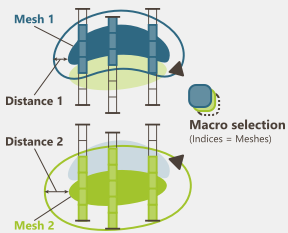
The Soft Boundaries utility allows you to compute a soft boundary macro-selection that expands a mesh by a specified distance during interpolation. This selection variable, defined in the input section of the interpolation tasks, determines which samples will be included during the neighborhood search step.
Note: For a more detailed analysis of the variation of a variable near a contact and the definition of the transition distance, it is recommended to use the Border Analysis tool.
Macro-selection definition
A macro-selection is a selection variable which contains more than one value for each data point, each value being stored in one index of the macro-selection.
As a variable can be a selection, it is to say a 1-bit variable affecting the value of 1 for each sample that meet the requirements and the value of 0 to the samples that do not meet the criteria, a macro-variable can be a macro-selection, made of several individual selections, each selection being attached to one index of the macro-selection.
Note: Statistics on a macro-selection may be obtained using Statistics/Statistics application by selecting the macro-selection and the targeted index.
Input
Select the Mesh File which contains the mesh(es) to be used to calculate the macro-selection.
A mesh can be composed of several objects, and it is possible to consider each of them as an individual mesh. The Mesh selection can be used as a restriction of the objects contained in the Mesh file. The Use meshes field lists the available meshes contained in the file. By default all the meshes contained in the file are automatically selected.
Note: The algorithm is designed to work with closed meshes. Otherwise, a warning message will be issued to alert the user of potential inconsistencies in the results.
Output
Select the output Data table in which the macro-selection variable will be stored. It can be of any type: points, boreholes or grid. A Selection can also be provided to use a specific subset of the output data for the calculation of the selection.
Define a name for the new Soft boundaries variable. This variable will be a macro-selection, with as many indices as meshes selected as input, and with alphanumeric indices corresponding to the names of each of the meshes.
As output results are saved in a macro variable, this one can be overwritten if it already exists by checking the Overwrite macro option. Otherwise, results will be appended (i.e. new indices will be added in the existing macro variable and the existing indices will be updated regarding the new input data and parameters).
Parameters
By default, a unique Distance value is applied to all input meshes.
Uncheck the Use same distance for all meshes option, to define a distance different for each input mesh.
Display
Select the 3D scene where the selection will be displayed after the run of the task.
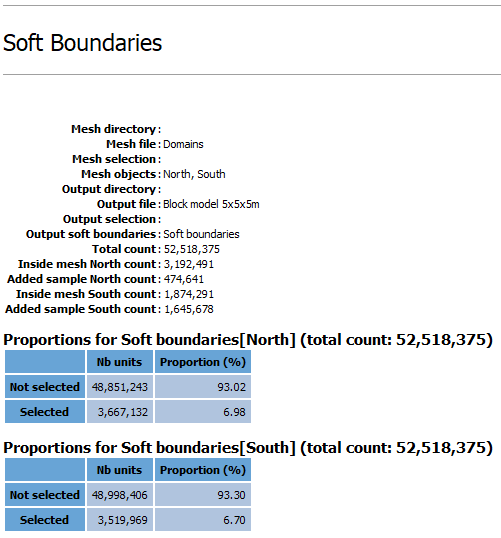
Statistics on the output variables are printed in the Messages window at the end of run.
Click Run to create a new macro-selection variable.
