
Histogram Properties
To access this screen:
-
In the Histogram screen, Charts tab, select a chart item from the list,
-
Click the Edit Chart Properties button:
 .
.
The Chart Parameters screen is used to define the histogram bin size, title and grid parameters.
To configure these settings:
-
In the Bin group, set the Bin Size. This field defines the overall 'capacity' of each histogram bar. In visual terms, this represents the overall width of each bar in relation to the X Axis scale.
-
Using default values, the scale of the Y Axis is automatically adjusted to ensure that all data fits on the plot.
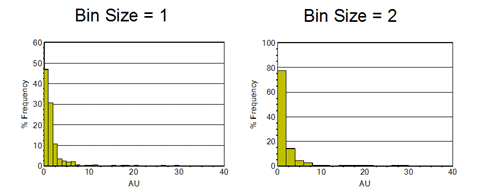
-
-
In the Display group, check Display Chart to show the chart, or clear it to hide the chart.
-
This option is enabled by default.
-
-
In the Titles group, accept the default labels or type custom labels for the chart title and axes.
-
Set Title, X Axis, and Y Axis descriptions as required, and select the font size for each from the drop-down.
-
Chart ID is read-only and represents the automatically-generated index description for the chart.
-
-
In the Legend group, check Legend to display a legend box.
-
Accept the default legend Title or type a custom description, then select a font size from the drop-down.
-
-
In the Comments group, check Comments to display comments in a text box.
-
Type the comment text. Use <Enter> to define multiple lines.
-
-
In the Grid group, check Grid to define custom grid parameters.
-
Set the Minimum and Maximum values for the X and Y axes.
-
Set the Grid interval for the X and Y axes.
-
-
In the Insert Marker group, define marker line controls as required.
-
Set the X Axis Position and Y Axis Position marker values.
-
Check Annotate Marker Point to annotate the XY coordinate of the marker.
-
-
In the Histogram Properties group, check Apply to all Histograms to apply the configured properties to all listed histogram charts.
-
Leave this option clear to apply the properties only to the selected histogram chart.
-
Related topics and activities:
