
Fit Model
To open this screen:
-
Select a chart from the list.
-
Click Edit Model Properties:

You can also:
-
Right click a chart on the Charts tab and select Edit Model Properties.
The Fit Model screen is used to define histogram model parameters for the selected chart.
To configure these settings:
-
In the Parameters area, enter the model distribution's Mean and Standard Deviation values.
-
Check Model to display the model distribution for the selected chart.
-
Check Log Normal Model to display a lognormal model distribution instead of a normal model distribution.
-
Click Restore Defaults to restore the default model parameters and settings.
Use the examples below to compare normal and probability-plot views of the fitted model.
Histogram Models
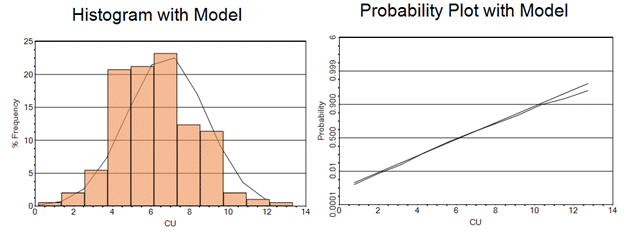
The theoretical distribution by default has the same mean and variance as the sample data. This is one way to show how close the sample histogram is to the theoretical normal (or lognormal) gaussian distribution. The graphic below shows a normal model as both a histogram (left) and a probability plot (right) together with the sample histogram and probability plot. The theoretical model is a straight line in the probability plot.
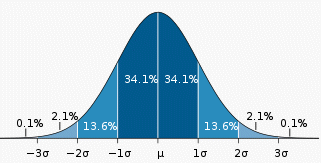
The graphic below shows a normal distribution with a mean of  and a standard deviation of ơ. It also shows the proportion of samples lying within each standard deviation from the mean.
Related topics and activities:
