
View Separate Solids and Fault Blocks
Wireframe solid data output from the Dynamic Modelling workflow is created as both a unified (combined) data object representing domains or fault blocks, supported by domain key fields for filtering and evaluation, but also as "separated solids"; independent data objects representing a particular domain or fault block.
See Dynamic Modelling Outputs.
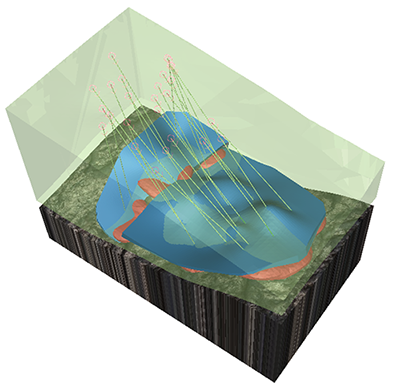
Geological modelling with independently formatted separated solids
This dual approach lets you retain a single reference for summary evaluations, data transfer and other analysis, and also separate data objects that can be formatted independently. This is ideal for more complex visualizations in the 3D window, such as providing domain-specific texture drapes, and so on.
The Dynamic Modelling interface shows controls for both combined and separated solid data after generation, for example, in the image below, the upper part of the screen shows the Domain task items (and respective processing status) with both Combined solids (GEOLOGY) and Separated Solids data objects shown in the Outputs section, for example:
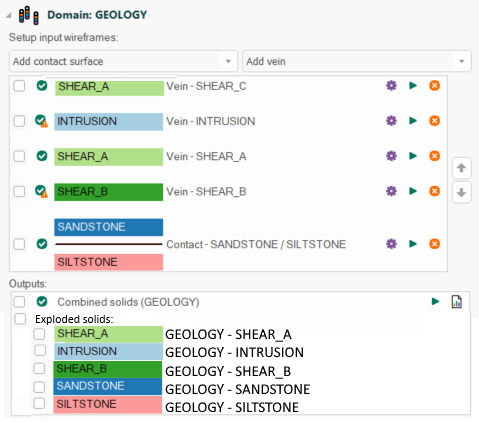
From here, you can hide or show any data (combined or independent domain wireframes) and format it, presenting it in the best way in a 3D window.
Note: Separated solids are listed in stratigraphic order with youngest at the top of the list and oldest at the bottom.
It's a similar set up for fault blocks. These are also created as a combined solid and independent fault block wireframes.
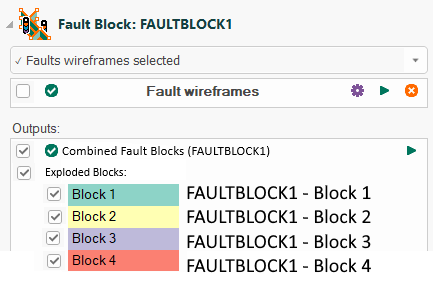
This makes it easy to, say, display a waste block with transparency, for example.
Show or hide any screen element using its check box, and double-click the domain or fault block name to display the corresponding Wireframe Properties screen. From here, you can change any visual property of the wireframe. See Formatting Wireframes.
Tip: To make wholesale visibility changes to all overlays, use the check box at the top of the list.
Related topics and activities:
