
Scheduling Setup: Bench Advance
To access this screen:
-
In the Scheduling Setup screen, select the Bench Advance tab.
Define the maximum number of benches a pushback may progress in a year (the sinking rate) and optionally choose the maximum daily mining rate for each pushback by bench.
This screen also lets you define the period after which a pushback can start, and the period by which the pushback must finish. When used, it is very important Start After and Finish By match Max Benches and other scheduling constraints.
For example, Starts After 2030 means the pushback can start in 2031 or later. Finish By 2031 means the pushback must be mined out in 2030 or earlier.
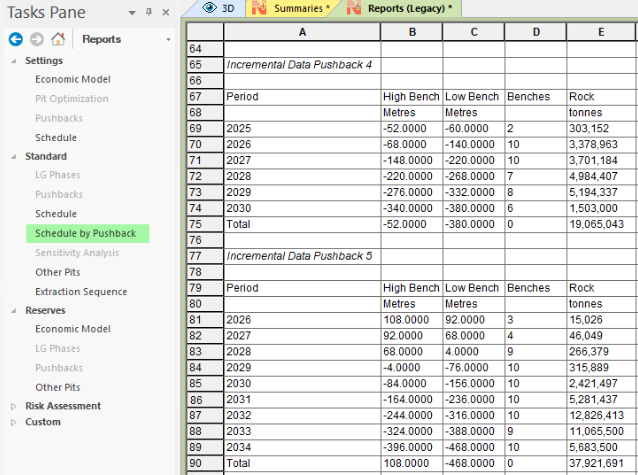
Tip: The Schedule by Pushback report can be used to monitor pushback progress (Reports pane >> Standard >> Schedule by Pushback.
When a pushback is selected, the Daily Mining Rates table is populated showing the toe elevation for each bench in this pushback and the bench mass.
-
Max Rate/Day needs to be set. The Scheduler will apply this rate to the bench mass to determine the numbers of days to mine a bench. Then the Sink Rate is computed so that these benches can be mined in 365 days or less.
-
Max Rate/Day should be set for the benches where the rate is changing. If a bench does not have a rate defined, Scheduler will use the rate for the upper bench.
Click Update Sink Rates to populate the Sink Rate column or Reset to clear all entries.
Tip: Use Set all to define the maximum bench advance to all pushbacks. Bench advance can be defined per pushback as needed.
To define the bench advance for a pushback:
-
In the Bench Advance (Sink Rate) table, set the Max Benches (the maximum number of benches that can be mined yearly (if no Finish By value is set) or before the finish year.
Note: You can set Max Benches for all pushbacks at once to any value using the controls at the bottom of the table.
-
If required, define Start After period to ensure pushback extraction doesn't occur until a particular point in time. If set to None, there is no constraint and pushback extraction is dictated by other schedule parameters and inputs.
-
Optionally, to set a completion constraint for the pushback, select a Finish By year. If set to None, the pushback finishes according to other parameters.
-
For a pushback, define the maximum daily mining rate using the table on the right. For each bench:
-
Review the Bench Mass.
-
Set the Max Rate/Day = maximum daily mining rate in Kilotons.
-
Click Update Sinking Rates to calculate variable per-bench sinking rates based on the maximum daily rate for the bench.
-
-
Save your scheduler settings.
Related topics and activities
