
Scheduling Setup: Pushbacks
To access this screen:
-
In the Scheduling Setup screen, select the Pushbacks tab.
Define the pushback file to be scheduled and the corresponding bench lags.
Pushbacks can be either be those generated using Studio NPVS+ (see Pushback Generation Essentials) or you can import pushback designs from outside the optimization workflow. You can also change the topography.
-
Choose Use Default Pushbacks & Topo to use a pushback set generated from the optimization workflow. In this case, the Schedule will use the pushbacks created by Studio NPVS+.
-
Choose Use Other Pushbacks or Topo to use imported designs.
-
Choose the Initial Topography from the list. All project surfaces are listed.
-
If using anything other than the default topography, pick a Pit Code that represents the desired topography (you can only select a surface number within a range valid for the selected data).
Note: Selecting the correct Pit Code is important when the initial topography file contains multiple surfaces.
-
The middle of the screen displays the pushback names (which can be edited) and each pushback's minimum tonnage to be mined before pausing pushback extraction.
Minimum to Mine
The Minimum to Mine parameter is needed to ensure pushbacks are mined in a continuous fashion.
For example, the Optimizer may choose to mine a pushback containing 38.083 Mt as follows:
- 15.24 Mt in 2026
- 16.77 Mt in 2027
- 4.65 Mt in 2028
- no mining in 2029 and 2030
- 1.42 Mt in 2031.
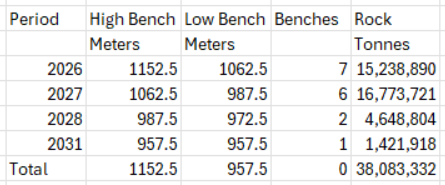
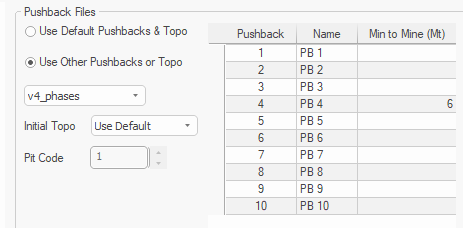
In most operations mining 1.4Mt in 2031 after pausing in 2029 and 2030 is not practical. To control this, set Min to Mine (in Mt) for each pushback. This is the minimum amount of rock mass to be mined from a pushback before pausing the pushback progress and continue mining later, or the minimum amount of rock mass to be mined from the pushback in the last consecutive periods. In the example below the minimum to mine from pushback 4 is set to 6,000,000 t.
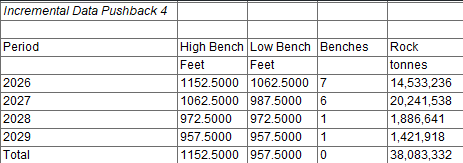
The new schedule shows pushback 4 is mined by 2029 in four consecutive periods without pause:
Note: Continuous mining of a pushback is desirable in most cases where blending is not required. In projects where blending is required, pushbacks do not need to be mined in a continuous fashion to allow mixing ore with different quality.
Note: Min to Mine should not exceed 30% of the pushback mass.
Note: When using Min to Mine, processing time will increase.
See Scheduling Pushbacks.
Bench Lags
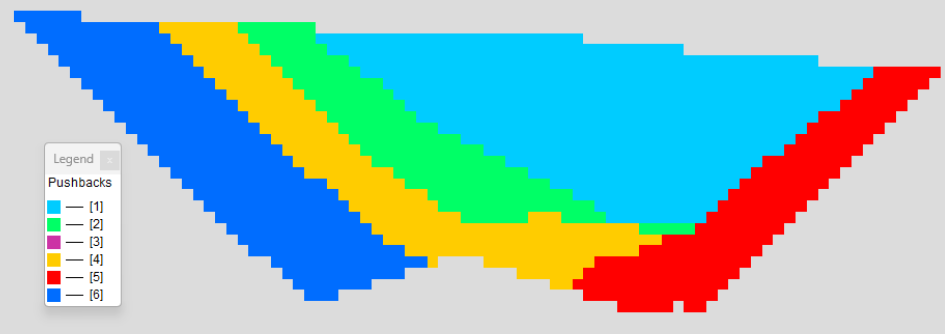
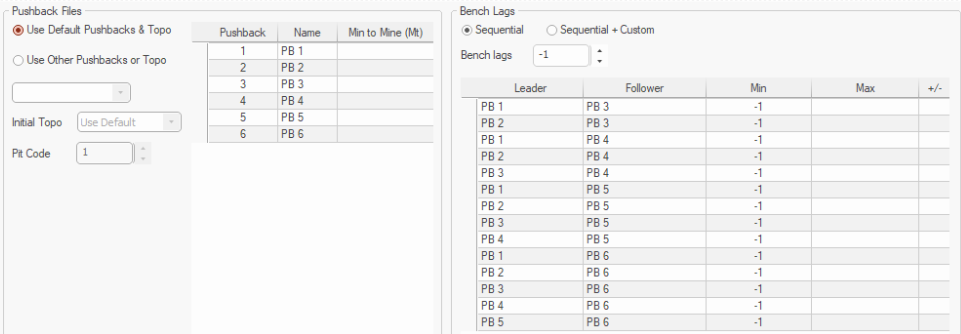
Studio NPVS+ defines the default pushback dependencies automatically considering all pushbacks and their geometry. Below is a picture showing six pushbacks in plan view:
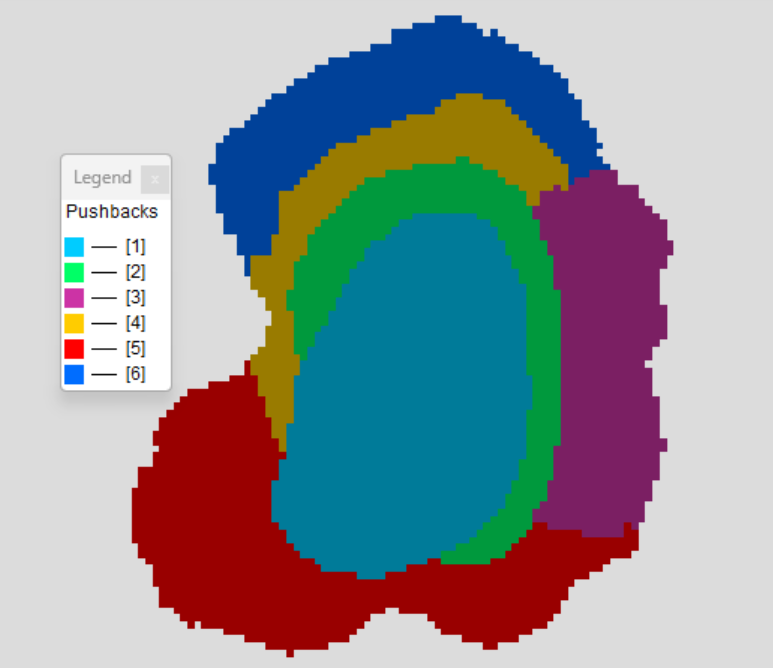
Pushback 2 is dependent on pushback 1 because mining pushback 2 without mining pushback 1 will cause undermining of pushback 1. Studio NPVS+ considers pushback 1 as a Leader and pushback 2 as a Follower. This relationship can be seen on the vertical section below:
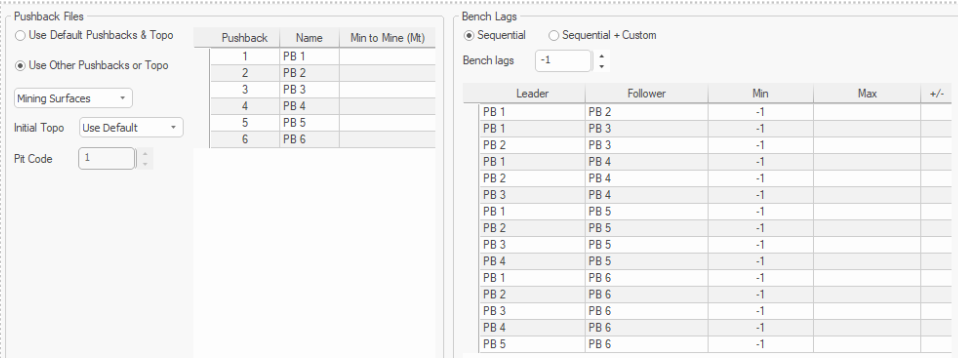
The right of the screen lists the default Bench Lags between all pushbacks.
Another pushback configuration is shown on the following two pictures in section and plan view. Here pushback 1 (PB1) and pushback 2 (PB2) are not dependent on each other, meaning pushback 2 can be mined before mining pushback 1 and this will not cause undermining:
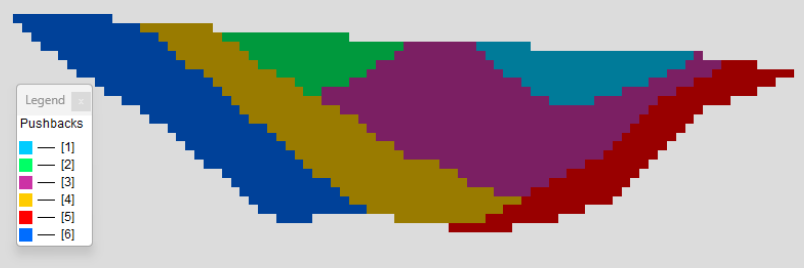
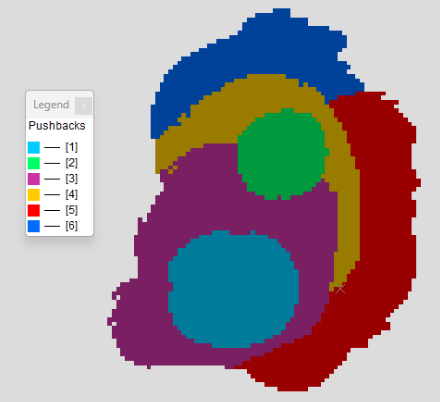
The corresponding default bench lags are shown below. Note there is no entry for the dependency between PB1 and PB2:
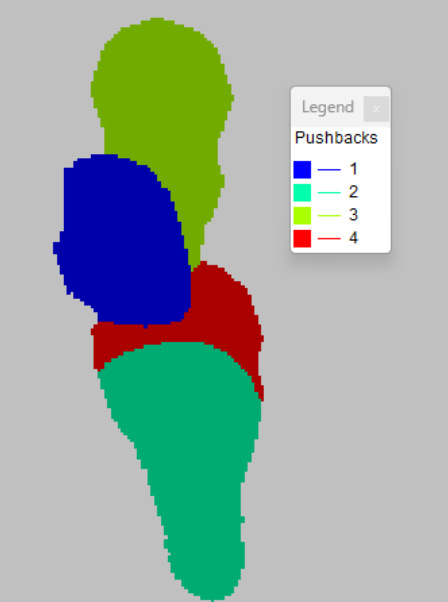
A third example with four pushbacks can be seen below where PB1 and PB2 do not depend on each other. Also, PB2 and PB3 do not depend on each other:
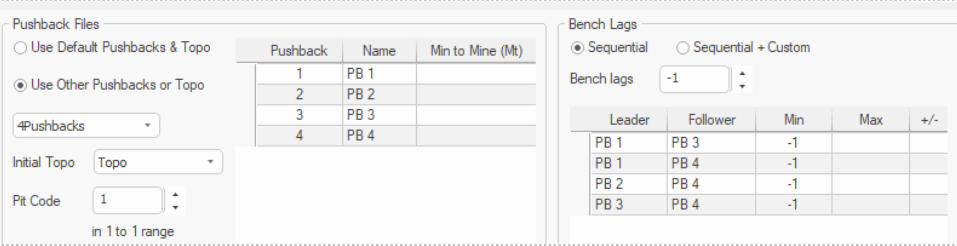
This relationship is seen in the default bench lags below where there is no dependency between PB1 and PB2 and no dependency between PB2 and PB3.
A "lag" is defined as the number of benches difference between two pushbacks in each period. The bench lag may be -1, zero or positive.
Bench lags can either be defined as either:
-
Sequential - Dependencies are automatically created between adjacent pushbacks. You can view the Leader and Follower relationship for the existing pushbacks, but you can't add or delete them. Only the Min lags can be modified.
-
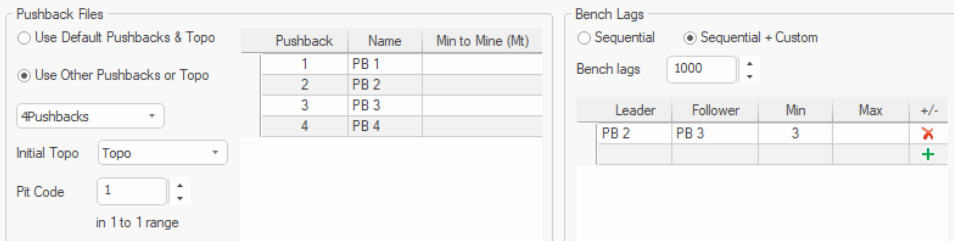
Sequential + Custom - With this option, all sequential dependencies are preserved, and new custom dependencies can be added. Select this option to maintain all sequential dependencies between the pushbacks and add additional bench lags.
In the previous example with four pushbacks, there is no default (sequential) dependency between PB2 and PB3. To set up minimum 3 benches lag between pushbacks 2 and 3, you could use the following settings :
Note: Use  or
or  to add or delete a custom dependency.
In summary: bench lags can be used to set how mining a pushback relates to mining the remaining pushbacks. Sequential is defining the geometric constraints that exist between the pushbacks, and the table is populated automatically.
Related topics and activities
