
Destinations
Destinations used by DTS
Destinations need to be configured if you want to:
- manage stockpiling
- schedule production to plants
- analyse the haulage requirements in a schedule. See Haulage Overview.
DTS supports 3 type of destination:
- General destination - usually used for waste dumps
- Plant - an ore processing plant. Material can only be moved to or through a plant.
- Stockpile - material can be moved to and moved from a stockpile.
Destinations are configured in all cases using the Destinations Settings screen.
Material can be sent to a destination by specifying the haulage destination for each activity, or even specifying a haulage destination per section, for example:
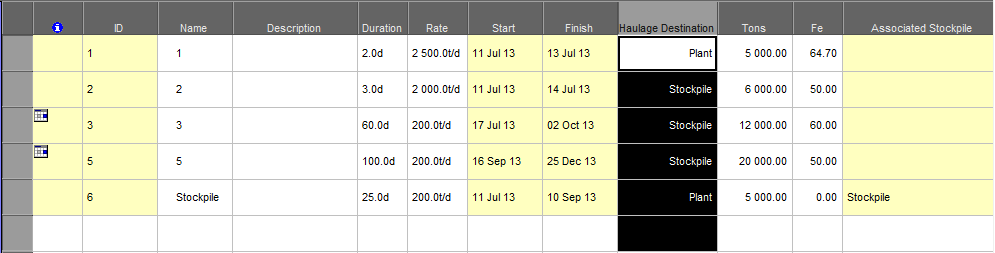
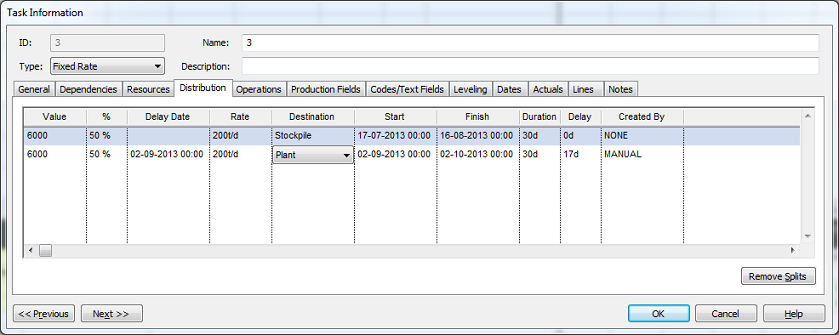
The system automatically generates an extraction task for each stockpile. The extraction task can be scheduled like any normal task, and resources assigned. The haulage destination on the extraction task can be set to another destination, for example, plant.
Destinations used by EPSolver
The solver algorithm used by EPSolver can consider targets specified on destinations in addition to targets specified on a schedule level.
When the Account for Destination Capacity option is selected, it is important to ensure that the capacity of stockpiles and dumps are set correctly. Likewise, the actual values on stockpiles at the start of the run should be updated to reflect the true state of the stockpile.
The algorithm will replace generic destinations assigned to tasks with actual destinations based on the candidate destinations specified for each generic destination as well as the Accept Material From options specified for each candidate destination.
Note: If you use Account for Destination Capacity option along with grade targets (for example, when blending), ensure that you specify the destinations to track the state of the applicable grades.
