
Local Parameters (Anisotropies)
The proportion model can be built taking into account local anisotropies. Local GeoStatistics is an original methodology fully dedicated to the local optimization of parameters involved in variogram-based models ensuring a better adequacy between the geostatistical model and the data.
It is used to determine and take into account locally varying parameters to address non stationarity and local anisotropies and allows to focus on local particularities. Run LGS on PluriGaussian Simulations requires the use of the SPDE calculator.
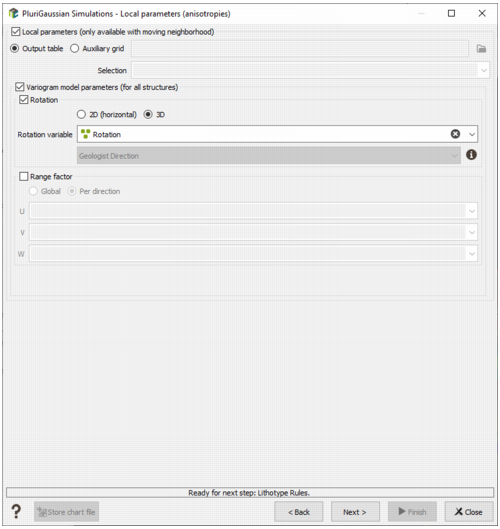
The Local Anisotropies page allows to load the parameters required to perform Local Geostatistics (LGS).
-
The local parameters should have been previously created using Local Anisotropies functionality. for example They can be stored directly on the output table on which the simulations will be calculated (Output table mode) or on a different grid (Auxiliary grid mode). In this case define the data table associated to the grid on which the local parameters are located. Then you have to assign its variables to the corresponding moving parameters. You can define an optional Selection on the auxiliary grid.
Note: When choosing the Auxiliary Grid mode, the local parameter will be interpolated at the target node locations. When using local rotation for neighborhoods or model, it is advised to check the output.
Note: If we choose to define local anisotropies, the neighborhood page will be skipped (not used with SPDE because a unique neighborhood is applied).
-
Variogram model parameters (for all structures):
-
Select Rotation if you wish to make the model rotation varying locally. This option has a sense only if the defined geostatistical set contains an anisotropic variogram model.
If your input data are 3D, select 2D (horizontal) to define a 2D rotation. Choose 3D if you wish to define a 3D rotation.
Select the Rotation variable that refers to the local rotation(s) in the local data table. To appear in the list, the variable should be associated to a Angle unit class in 2D and defined as a Rotation in 3D (see the Create Rotation task). Be careful that the rotation is defined in the right Rotation convention.
- Select Range factor if you wish make the different structure ranges varying locally. The ranges of the different structures will be multiplied by a given factor. This option has a sense only if the defined geostatistical set contains an anisotropic variogram model. The factor can be Global, in this way the proportion between all the ranges will be kept, or Per direction, to apply a factor different for each U/V(/W) direction.
-
Note: All the variables defined in this panel are read from the local data table. The local data table must be of the same dimension (2D/3D) as the input data file it is referring to.
Click on the Next button to go to the following window dedicated to the neighborhood parameters. The selected automatic inferences are launched, and the next window is displayed at the end of these calculations.
