
Haulage Parameter Tests
To access this screen:
-
Optimization control bar >> Scheduler >> Haulage Info and select the Parameter Tests tab.
Test the viability of currently defined destination, rock type and haulage parameters for a given block location. This is a useful way of validating inputs and calibrating settings before computing truck hours. The purpose of this dialog is to validate the accuracy of all haulage related inputs before generating a schedule.
Select a particular block, its pushback, rock type, and destination and check the total cycle time plus the equivalent flat haul (EFH) for each of the haulage segments.
The inputs to this calculation are:
- The block XYZ coordinates you wish to test (either in world coordinates or the relative position to the model origin)
- A specific pushback (by index)
- A Rock type as previously defined
- A previously-defined Haulage destination
- The Tonnage (Mass) available at destination
Enter the relevant block coordinates into the fields on this panel and click CALCULATE to generate the Equivalent Flat Haul (EFH distance), for the pushback / rock type / destination / block location between:
- the block location and nearest bench exit.
- the bench exit to the pit exit
- the pit exit and the selected destination exit
- the destination exit and the dump point
Note: EFH is the distance a truck will travel, under the same load conditions, on a flat haul in the time taken to travel on a specified route profile. See Haulage Analysis for more details.
To test haulage parameters:
-
First, define Haulage Destinations, Haulage Sources and Exit Benches.
-
Display the Parameter Tests screen.
-
Choose how to define the Block coordinates. There are two ways to do this:
-
Choose Use World coordinates of block centers and enter the XYZ location of a block centroid using either world coordinates, or a local coordinate relative to the block model origin.
Note: You can only enter a coordinate that is contained within the current mine. This block location will be used to calculate the related EFH distances.
If you attempt to select a position that isn't feasible (for example, as it sits outside the ultimate pit) you are shown a warning. If using world coordinates, you are shown a valid range next to the coordinate input field. In the following example, you can enter X values between
4705mand5495monly: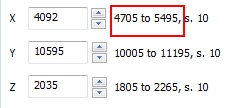
-
Alternatively, choose Use Model coordinates and use the nX, nY and nZ fields to define a cell reference. The location of this cell determines the coordinates of the block.
-
-
Define the Pushback No. This is the pushback index to which the selected block coordinates are relevant.
-
Select a valid Rock type label, for example Oxide, Sulfide, Waste and so on, whatever was defined during model import.
-
Select a Destination label. Destinations were defined in Economic Model settings.
-
(Where applicable) define the rock Mass at destination. This is the mass delivered to the destination prior to mining of the particular block.
-
Click CALCULATE and review the results:
- From block location to the nearest bench exit – shows the EFH (in thousands of meters or feet) from the block to nearest bench exit and return.
-
From bench exit to pit exit – shows the EFH (in thousands of meters or feet) for the ramp haul up and down the ramp including its components.
-
Gradient factor per bench – shows the gradient factor multiplied by bench height.
-
Times bench difference between exits– shows the number of benches between the bench exit elevation and pit exit elevation of the particular block.
-
-
From pit exit to destination exit- shows the EFH (in thousands of meters or feet) for the surface haul to and from the haulage destination
-
From destination exit to dump point– (where applicable) shows the EFH (in thousands of meters or feet) for the two way haul inside the destination
-
Cycle Time– shows the round trip (in minutes) for one truck load
-
-
Experiment with other parameters and tests or click OK to return to the main application.
Related topics and activities
