
General Settings: Calculation
To access this screen:
-
Project Settings >> Project >> Calculation.
Use this screen to configure your project's default calculation options.
This screen defines the core calculation settings for the project. These settings control how DTS calculates time, quantities, and scheduling logic across all tasks in the project.
Note: The values you define here apply globally unless a specific task overrides them. Review these settings carefully before you run calculations, as they directly affect schedule results and reported outputs.
| Field | Description |
| Automatic Calculation |
Check to automatically reschedule the entire project whenever a change is made (for example, a dependency is added). |
| When a calculated field has no applicable formula, set value to 0 |
This option affects all properties that have formulas defined that do not apply to all tasks, but rather apply to a subset of tasks as defined by the filter associated with this formula. A situation can arise whereby a calculated field does not have an applicable formula for a specific task (because the task does not conform to any of the defined filters). Switching this option on causes the relevant field to be set to 0 (production field) or an empty string (text field). Note: If the task previously had its value calculated by a formula, this is overwritten. |
| Calculate summary values from filtered items only |
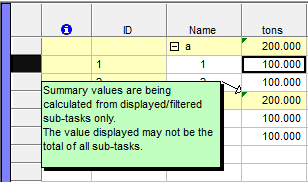
Assume you have applied a grouping, resulting in summary bars being displayed. Assume also that a filter has been applied resulting in some sub-tasks not being displayed. The question now arises as to whether the summary bar should show the summary of all tasks that normally fall under the summary, or only those filtered tasks that currently fall under the summary. Either way, there is the possibility of misinterpreting the results.
The image above shows such a case, and also shows the green information triangle in the top-left corner, indicating that additional information about this condition is available by hovering over the triangle with the mouse cursor. |
Related topics and activities:
