
Table Editor Automation
The Table Editor provides many features for manipulating the structure of Datamine format files (.dm). Offering an intuitive user interface, it is easy to perform table-wide changes, based on simple or complex logical instructions.
It can also be used as a standalone, scripted component and supports a feature-rich automation interface. For more information, see the Table Editor Introduction.
Prerequisites for the Following Topics
Before embarking on a scripting project you should be aware that a minimum level of experience is required in order to understand and implement the information shown in this group of topics, namely:
-
A working knowledge of the Table Editor's 'presentation layer' is required.
-
Familiarity with the basic principles of the Component Object Model (COM) is required, and an understanding of how objects are created, accessed and modified using proprietary scripting languages.
-
Although a detailed working knowledge of JavaScript is not essential, as any COM scripting language can be used to manage Table Editor components, the topics in this section show examples written in JavaScript to demonstrate how classes, functions and properties inter-relate, and how they are accessed.
-
Similarly, an appreciation of HTML constructs would be beneficial.
-
Some familiarity with the structure of data types within CAE applications would be useful, but not essential.
-
If using Internet Explorer to access the Table Editor control, you must ensure that your security settings permit the launching of ActiveX controls and scripts.
Table Editor Scripting Topics
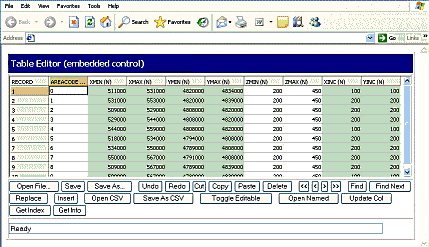
Table Editor Control Embedded in the Studio Customization window
Whether automation is used to provide a custom interface for existing functionality, to provide customized command lists to execute complex but repeatable processes on multiple data sets, or simply to perform batch processing on a variety of files, or subsets, the way that components can be scripted depends on the required results: many approaches exist to reach the same outcome.
The topics in this section demonstrate some of the ways that Table Editor functions can be called, the types of parameters that can be passed, and how this approach fits into the scripting environment that you may be familiar with.
Note: The scripting language demonstrated throughout these topics is Javascript.
A tutorial containing examples is provided, to allow you to undertake common automation tasks, as well as a brief API reference section.
The following Table Editor scripting topics are available:
-
Introducing The Table Editor Component: getting started, embedding the component and loading a file.
-
Scripting functions: providing the interface for your custom controls, and adding a simple control.
-
Tutorial: Creating a Custom Table Editor Interface: constructing a Web Table Editor that includes the basic functions of the installed version.
-
Further Script Examples: Open/Close/Save file, adding an edit toggle button, showing a status bar, filtering data and other examples.
-
Table Editor API Reference: an overview of available methods and properties.
Warning: As with all scripting exercises, care should be taken not to edit the column names of Datamine files unless you are confident that by doing so, you do not corrupt the underlying data, or cause the database to fail in subsequent operations. Back up important data first.
Related topics and activities