
Stereonet Data Selection
To access this screen:
-
Display the Stereonet screen and select the Data Selection tab.
The Data Selection tab of the Stereonet screen is used to select the structure points data for a stereonet plot.
You can use loaded data or an external data file, then select the dip direction, dip, and optional key field.
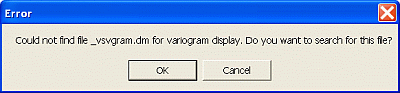
If a project file contains charts that use linked files instead of loaded data, and those linked files cannot be located, an error message displays.
To define stereonet data inputs and key fields:
-
In Files and Fields, choose the source for the structure points data.
-
To use a loaded points object, select Loaded Data.
-
Select the loaded points Object Name.
-
To use an external points data file, select Data File. This option is for a file that is not already loaded in a 3D window.
Note: If you select Data File, you cannot select data points in the stereonet and view their corresponding points in 3D windows. Use Loaded Data for that workflow.
-
Check the selected File Name.
-
To select a different project data file, click the browse button.

The Project Browser opens.
-
Select a `.dm` data file that has been added to the project.
-
-
To reload the selected data file, click the refresh button.

-
Select the structure points dip field from the Dip list.
If the standard field name SDIP is present in the data file or object, it is automatically detected and selected. Default: SDIP.
-
Select the structure points dip direction field from the Dip Direction list.
If the standard field name DIPDIRN is present in the data file or object, it is automatically detected and selected. Default: DIPDIRN.
-
Select the Key Field if required.
The key field is used to generate multiple stereonet plots, one for each key field value; for example, by rock type or joint set.
Note: Press and hold CTRL, then click a selected item to clear the selection.
-
Review the chart information in the Summary pane.
-
Click Apply.
The stereonet is generated and displayed in the Preview Pane. Generate the stereonet before moving to the next tab.
Related topics and activities:
