
Specify Cut-off Methods and Values
As part of defining the economics for your MSO run, you can decide how a Cut Off grade is determined from the input block model data.
Activity steps
-
Create or select a scenario.
-
Configure a block model.
-
Display the Economics screen.
-
Expand the Cut Off control group.
-
Expand Method to choose how the cut off value is assigned for your scenario.
-
Discrete – Specify a single, constant Value. This is the fixed threshold used to filter out sub-economic blocks.
-
Curve Table – Create a lookup table to vary cut-off by domain or zone, allowing more granular control by geotechnical or spatial factors.
-
Select the geotechnical or spatial factor using Grade At Type:
-
Stope Tonnage
-
Stope Thickness
-
Stope Height
-
Stope Elevation
-
Cross Sectional Area
-
Roof Hydraulic Radius
-
Wall Hydraulic Radius
-
Cross Section Hydraulic Radius
-
-
Use + to create a new table rows.
-
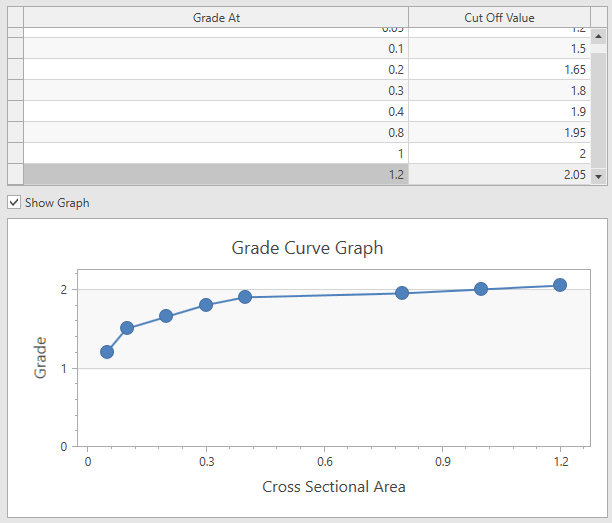
For each row, enter a Grade At and Cut Off Value.
-
Show an XY grade curve graph by checking Show Graph, for example:
-
-
From Block Model – The cut off is read directly from a field in the block model on a per-block basis.
-
Select the block model Field containing values.
-
Enter a Default value to use in place of absent data.
-
-
Nested – Enables evaluation of a range of cut-off values in a single run to analyze sensitivities or select optimal thresholds post-run.
-
Use + to create a new table rows.
-
Enter a unique cut off Value for each added row.
-
-
-
Save your settings.
Related topics and activities
